


We've taken a look at the underlying technologies that power images and containers, and a few working examples. Now, for the grand finale: we'll create an OCI image manually, from scratch, and then run it.
A test program
Here's a little "hello world" program, that also checks for an environment variable, and a file in the current directory, and logs their contents (if present).
#include <stdio.h>
#include <stdlib.h>
#include <string.h>

void
main()
{
    // say hello
    printf( "Hello, world!\n" ) ;

    // check if a greeting env.var. has been set
    char* p = getenv( "GREETING" ) ;
    if ( p != NULL ) {
        // yup - log its contents
        printf( "- $GREETING = \"%s\"\n", p ) ;
    } else {
        // nope - log it
        printf( "- $GREETING = <not set>\n" ) ;
    }

    // check if there's a greeting file
    FILE* fp = fopen( "greeting.txt", "r" ) ;
    if ( fp != NULL ) {
        // yup - log its contents
        char buf[ 80 ] ;
        size_t maxBytes = sizeof(buf) - 5 ;
        size_t nBytes = fread( buf, 1, sizeof(buf), fp ) ;
        if ( nBytes <= maxBytes )
            buf[nBytes] = '\0' ;
        else
            strcpy( buf + maxBytes, " ..." ) ;
        printf( "- greeting.txt = \"%s\"", buf ) ;
    } else {
        // nope - log it
        printf( "- greeting.txt = <not present>\n" ) ;
    }
}
| Note that when we compile this, we create a statically linked binary[1]You may need to install the static libraries, with something like dnf install glibc-static. i.e. it won't need any shared runtime libraries, which it won't have access to when running inside a container. |
$ cc -static -o hello hello.c $ ls -l total 1812 -rwxr-xr-x. 1 taka taka 1851216 Sep 23 23:17 hello -rw-r--r--. 1 taka taka 961 Sep 23 02:43 hello.c |
Building the OCI image
We'll now build an OCI image manually, using nothing but tar and raw config files. If there were a Dockerfile, it would look like this:
FROM scratch
COPY ./hello /
WORKDIR /
ENTRYPOINT [ "./hello" ]
Specify the image layout version
First up, we need file that specifies what version of the OCI image layout we will be using. Create a temp directory to build the image in, and create a file in it called oci-layout:
{
    "imageLayoutVersion": "1.0.0"
}
Easy 
Create the root file system
Our root file system will consist of a single file, the hello binary we created above, which we tar up:
$ tar cf layer1.tar -C ... hello
where ... is the directory where you compiled the program to.
Note the use of -C, which will cd to the specified directory before doing the tar, since it's important that the hello file appear in the root of our tar file.
Everything in an OCI image is referenced by the hash of its content, so for the tar'ed root file system we just created:
$ sha256sum layer1.tar
b93f8d790317fb227eb371c323998d44a42a2f8ef4f0b34662a3ea8baaae0b6c  layer1.tar
This file goes in a directory called blobs/{algo}/, renamed to its hash:
$ mkdir -p blobs/sha256

$ mv layer1.tar blobs/sha256/b93f8d790317fb227eb371c323998d44a42a2f8ef4f0b34662a3ea8baaae0b6c
Create the image config
We also need a config file for the image, so create a file called config.json:
{
    "architecture": "amd64",
    "os": "linux",
    "config": {
        "Entrypoint": [ "/hello" ],
        "WorkingDir": "/"
    },
    "rootfs": {
        "type": "layers",
        "diff_ids": [
            "sha256:b93f8d790317fb227eb371c323998d44a42a2f8ef4f0b34662a3ea8baaae0b6c"
        ]
    }
}
This file specifies:
- what architecture and operating system this image is for
- what the entrypoint command and working directory are
- the layers[2]For now, we only have one layer, but we'll add another one later. that make up the root file system (the b93f8d7... hash references the layer1.tar file we just created above)
We only have one layer right now, but these are listed from the bottom up i.e. the first entry is the base layer, the next one is the next layer above it, the final entry is the top-most layer.
This file is also referenced by its hash, so let's set that up:
$ sha256sum config.json
74f564a3c121977bf03bd84aa1c56ca1be0837822a36f6410d2c8bfcf25b006e  config.json

$ mv config.json blobs/sha256/74f564a3c121977bf03bd84aa1c56ca1be0837822a36f6410d2c8bfcf25b006e
If you're following along at home, this is what we have so far:
$ tree
.
├── blobs
│   └── sha256
│       ├── 74f564a3c121977bf03bd84aa1c56ca1be0837822a36f6410d2c8bfcf25b006e
│       └── b93f8d790317fb227eb371c323998d44a42a2f8ef4f0b34662a3ea8baaae0b6c
└── oci-layout

2 directories, 3 files
Create a manifest for the image
Next up, we need a manifest that specifies the config and layers needed to run a container on a specified architecture and operating system.
Create a file called manifest.json:
{
    "schemaVersion": 2,
    "config": {
        "mediaType": "application/vnd.oci.image.config.v1+json",
        "size": 303,
        "digest": "sha256:74f564a3c121977bf03bd84aa1c56ca1be0837822a36f6410d2c8bfcf25b006e"
    },
    "layers": [
        {
            "mediaType": "application/vnd.oci.image.layer.v1.tar",
            "size": 1853440,
            "digest": "sha256:b93f8d790317fb227eb371c323998d44a42a2f8ef4f0b34662a3ea8baaae0b6c"
        }
    ]
}
The b93f8d7... hash references[3]Sections that reference other parts of the image like this are known as content descriptors. the layer1.tar file, same as before, while 74f564a3... is a reference to config.json.
And yup, this file itself is also referenced by its hash:
$ sha256sum manifest.json
3744d29b4cbcd0a6d86fcd18b9700705e5de3e95b171b027bcc27602daa6499f  manifest.json

$ mv manifest.json blobs/sha256/3744d29b4cbcd0a6d86fcd18b9700705e5de3e95b171b027bcc27602daa6499f
This is now what we have:
$ tree
.
├── blobs
│   └── sha256
│       ├── 3744d29b4cbcd0a6d86fcd18b9700705e5de3e95b171b027bcc27602daa6499f
│       ├── 74f564a3c121977bf03bd84aa1c56ca1be0837822a36f6410d2c8bfcf25b006e
│       └── b93f8d790317fb227eb371c323998d44a42a2f8ef4f0b34662a3ea8baaae0b6c
└── oci-layout

2 directories, 4 files
Create an index
The manifest we just created above is for a specific architecture and OS, but an image can support multiple combinations of these, so we need another top-level index file that lists what's available.
Create a file in your work directory called index.json:
{
    "schemaVersion": 2,
    "manifests": [
        {
            "mediaType": "application/vnd.oci.image.manifest.v1+json",
            "size": 463,
            "digest": "sha256:3744d29b4cbcd0a6d86fcd18b9700705e5de3e95b171b027bcc27602daa6499f",
            "platform": {
                "architecture": "amd64",
                "os": "linux"
            }
        }
    ]
}
The 3744d29b... hash references the manifest.json file we created in the previous step.
Since this is the main entry point into the image, it can't be named after its hash, since it needs to have a fixed name (so that it can be found), so we leave it at index.json.
This completes the image, and this is what we have:
$ tree
.
├── blobs
│   └── sha256
│       ├── 3744d29b4cbcd0a6d86fcd18b9700705e5de3e95b171b027bcc27602daa6499f    ← manifest.json (463 bytes)
│       ├── 74f564a3c121977bf03bd84aa1c56ca1be0837822a36f6410d2c8bfcf25b006e    ← config.json (303 bytes)
│       └── b93f8d790317fb227eb371c323998d44a42a2f8ef4f0b34662a3ea8baaae0b6c    ← layer1.tar (1853440 bytes)
├── index.json
└── oci-layout

2 directories, 5 files
The final image
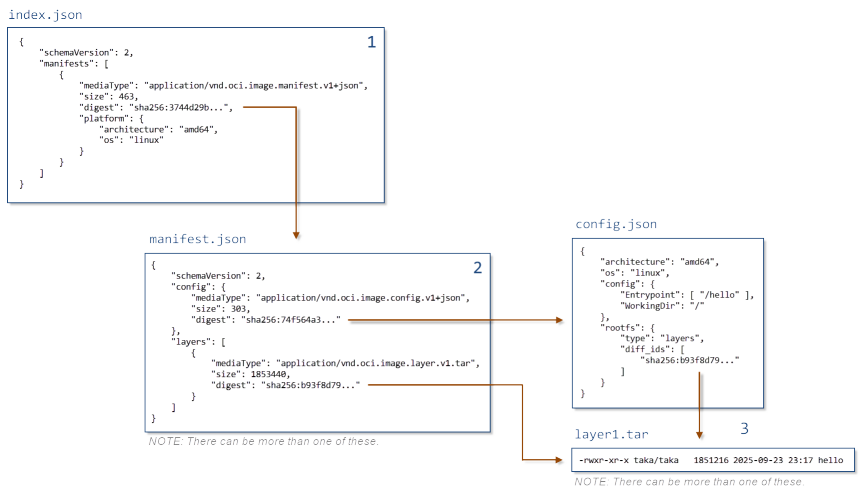
To recap what we've just built:
- the main entry point is index.json, which lists images for various combinations of architecture and OS
- for a given architecture and OS, there is a manifest
- the manifest specifies where the image's config settings are, and the layers need to create the root file system
Running a container from this image
All we have to do now is tar everything up, and import it into podman[4]Because Docker apparently still doesn't support OCI images  [5]If you have trouble getting this to work, run podman with --log-level=debug to get lots of useful information about what it's doing.:
$ tar cvf /tmp/my-image.tar .
./
./index.json
./blobs/
./blobs/sha256/
./blobs/sha256/3744d29b4cbcd0a6d86fcd18b9700705e5de3e95b171b027bcc27602daa6499f
./blobs/sha256/74f564a3c121977bf03bd84aa1c56ca1be0837822a36f6410d2c8bfcf25b006e
./blobs/sha256/b93f8d790317fb227eb371c323998d44a42a2f8ef4f0b34662a3ea8baaae0b6c
./oci-layout

$ podman load -i /tmp/my-image.tar
Getting image source signatures
Copying blob b93f8d790317 done      ← this is our layer1.tar file
Copying config 74f564a3c1 done      ← this is our config.json
Writing manifest to image destination
Storing signatures
Loaded image(s): sha256:74f564a3c121977bf03bd84aa1c56ca1be0837822a36f6410d2c8bfcf25b006e

$ podman images
REPOSITORY  TAG         IMAGE ID      CREATED             SIZE
<none>      <none>      74f564a3c121  About a minute ago  1.85 MB
Note that the IMAGE ID is the same as the hash for the config.json file we created earlier.
Finally, we can create and run a container from this image:
$ podman run --rm -it 74f564a3c121
Hello, world!
- $GREETING = <not set>
- greeting.txt = <not present>
Extending the image
Our test program checks for the presence of a file called greeting.txt in the same directory as itself, and an environment variable GREETING, so let's add these in.
Since we're using an overlay file system, we don't need to touch the root file system we created earlier, we just create a new layer that sits on top of it, with a new greeting.txt file:
$ echo -n "Yo, dawg!" >/tmp/greeting.txt

$ tar cf layer2.tar -C /tmp/ greeting.txt

$ sha256sum layer2.tar
b1e239b2b8e7a2049dacd4b8a8762a61efa2673469892cf3ba923cf798cf50b2  layer2.tar

$ mv layer2.tar blobs/sha256/b1e239b2b8e7a2049dacd4b8a8762a61efa2673469892cf3ba923cf798cf50b2
We now need to add this layer to our config files.
Edit config.json, which was renamed to blobs/sha256/74f564a3c121977bf03bd84aa1c56ca1be0837822a36f6410d2c8bfcf25b006e:
{
    "architecture": "amd64",
    "os": "linux",
    "config": {
        "Entrypoint": [ "/hello" ],
        "WorkingDir": "/",
        "Env": [ "GREETING=G'day!" ]   ← add this
    },
    "rootfs": {
        "type": "layers",
        "diff_ids": [
            "sha256:b93f8d790317fb227eb371c323998d44a42a2f8ef4f0b34662a3ea8baaae0b6c",
            "sha256:b1e239b2b8e7a2049dacd4b8a8762a61efa2673469892cf3ba923cf798cf50b2"   ← add this
        ]
    }
}
While we're here, we also add in the new environment variable.
And in manifest.json, which was renamed to blobs/sha256/3744d29b4cbcd0a6d86fcd18b9700705e5de3e95b171b027bcc27602daa6499f:
{
    "schemaVersion": 2,
    "config": {
        "mediaType": "application/vnd.oci.image.config.v1+json",
        "size": 303,
        "digest": "sha256:74f564a3c121977bf03bd84aa1c56ca1be0837822a36f6410d2c8bfcf25b006e"
    },
    "layers": [
        {
            "mediaType": "application/vnd.oci.image.layer.v1.tar",
            "size": 1853440,
            "digest": "sha256:b93f8d790317fb227eb371c323998d44a42a2f8ef4f0b34662a3ea8baaae0b6c"
        },
add the following ↓
        {
            "mediaType": "application/vnd.oci.image.layer.v1.tar",
            "size": 10240,
            "digest": "sha256:b1e239b2b8e7a2049dacd4b8a8762a61efa2673469892cf3ba923cf798cf50b2"
        }
up to here ↑
    ]
}
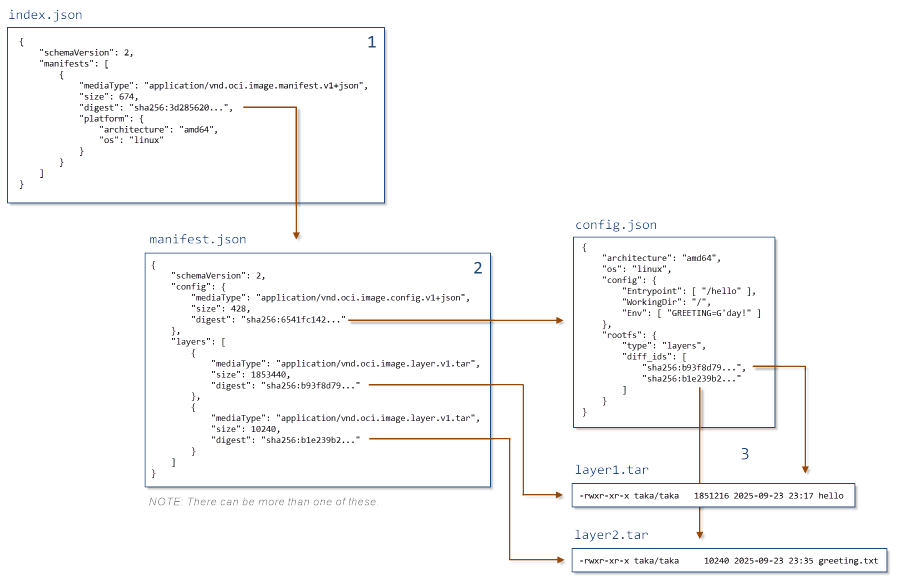
In both cases, layers are listed from the bottom up, so since we want this new layer to sit on top of the old one, the new entry comes after the old one in the list.
Unfortunately, in both cases, these changes will cause the files to have different hashes and sizes, so we need to go through the hierarchy and update these values.
First up, we rename the config.json file, based on its new hash:
$ sha256sum blobs/sha256/74f564a3c121977bf03bd84aa1c56ca1be0837822a36f6410d2c8bfcf25b006e
6541fc1426e4be74dcf4f74223011e8bc90a8a7c05a2ba1e01e74e350c316e10  blobs/sha256/74f564a3c121977bf03bd84aa1c56ca1be0837822a36f6410d2c8bfcf25b006e

$ ls -l blobs/sha256/74f564a3c121977bf03bd84aa1c56ca1be0837822a36f6410d2c8bfcf25b006e
-rw-r--r--. 1 taka taka 428 Sep 24 02:49 blobs/sha256/74f564a3c121977bf03bd84aa1c56ca1be0837822a36f6410d2c8bfcf25b006e

$ mv blobs/sha256/74f564a3c121977bf03bd84aa1c56ca1be0837822a36f6410d2c8bfcf25b006e blobs/sha256/6541fc1426e4be74dcf4f74223011e8bc90a8a7c05a2ba1e01e74e350c316e10
And update the reference in blobs/sha256/3744d29b4cbcd0a6d86fcd18b9700705e5de3e95b171b027bcc27602daa6499f (originally manifest.json) to point to this new file, and its new size:
{
    "schemaVersion": 2,
    "config": {
        "mediaType": "application/vnd.oci.image.config.v1+json",
        "size": 428,   ← update this
        "digest": "sha256:6541fc1426e4be74dcf4f74223011e8bc90a8a7c05a2ba1e01e74e350c316e10"   ← and this
    },
    "layers": [
...snip...
    ]
}
Then we do the same for manifest.json:
$ sha256sum blobs/sha256/3744d29b4cbcd0a6d86fcd18b9700705e5de3e95b171b027bcc27602daa6499f
3d28562050dc40ec720eea5c4acd600afbbf145928bba330b2268d70ab835145  blobs/sha256/3744d29b4cbcd0a6d86fcd18b9700705e5de3e95b171b027bcc27602daa6499f

$ ls -l blobs/sha256/3744d29b4cbcd0a6d86fcd18b9700705e5de3e95b171b027bcc27602daa6499f
-rw-r--r--. 1 taka taka 674 Sep 24 02:52 blobs/sha256/3744d29b4cbcd0a6d86fcd18b9700705e5de3e95b171b027bcc27602daa6499f

$ mv blobs/sha256/3744d29b4cbcd0a6d86fcd18b9700705e5de3e95b171b027bcc27602daa6499f blobs/sha256/3d28562050dc40ec720eea5c4acd600afbbf145928bba330b2268d70ab835145
Finally, update the reference in index.json to point to this new file, and its new size:
{
    "schemaVersion": 2,
    "manifests": [
        {
            "mediaType": "application/vnd.oci.image.manifest.v1+json",
            "size": 674,   ← update this
            "digest": "sha256:3d28562050dc40ec720eea5c4acd600afbbf145928bba330b2268d70ab835145",   ← and this
            "platform": {
                "architecture": "amd64",
                "os": "linux"
            }
        }
    ]
}
This is how our image is now arranged:
Running the updated image
We can now tar everything up and import it into podman:
$ tar c . | podman load
Getting image source signatures
Copying blob b93f8d790317 skipped: already exists   ← this is our layer1.tar file that we already imported
Copying blob b1e239b2b8e7 done                      ← this is our new layer2.tar file
Copying config 6541fc1426 done                      ← this is our new config file
Writing manifest to image destination
Storing signatures
Loaded image(s): sha256:6541fc1426e4be74dcf4f74223011e8bc90a8a7c05a2ba1e01e74e350c316e10

$ podman images
REPOSITORY  TAG         IMAGE ID      CREATED             SIZE
<none>      <none>      6541fc1426e4  About a minute ago  1.87 MB
<none>      <none>      74f564a3c121  8 minutes ago       1.85 MB
When we run this new image, we can see that it's detected the new greeting.txt file, and GREETING environment variable:
$ podman run --rm -it 6541fc1426e4
Hello, world!
- $GREETING = "G'day!"
- greeting.txt = "Yo, dawg!"
References
| ↵1 | You may need to install the static libraries, with something like dnf install glibc-static. |
|---|---|
| ↵2 | For now, we only have one layer, but we'll add another one later. |
| ↵3 | Sections that reference other parts of the image like this are known as content descriptors. |
| ↵4 | Because Docker apparently still doesn't support OCI images |
| ↵5 | If you have trouble getting this to work, run podman with --log-level=debug to get lots of useful information about what it's doing. |


 I am a
