


Docker Hub is Docker's main online registry, and is where images are downloaded from when you run docker pull.
 To configure Nexus to proxy for this, first create a new blob store for its artifacts[1]This step is optional, if you want to store the cached artifacts in their own sub-directory..
 Then create a new repository, of type docker (proxy).
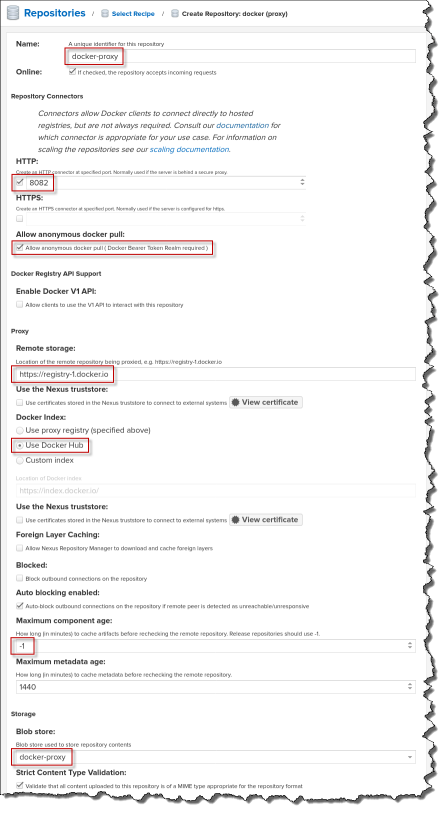 To configure the repo:
- Give the repo a name (e.g. docker-proxy).
- Create an HTTP connector at port 8082[2]Docker needs to be handled over a separate port since most Nexus repositories are handled via a URL of the form http://nexus3:8081/repository/{REPO-NAME}/..., but this is not a valid Docker image name..
- Allow anonymous pulls.
- Use the suggested URL for the remote repository (https://registry-1.docker.io).
- Change the Docker Index to use Docker Hub.
- If you want to make downloaded artifacts immutable[3]You may not want to do this if you pull the :latest version of images., set the Maximum component age to -1.
- Configure the blob store you want to keep downloaded artifacts in.
Because Nexus is now listening on a new port, add --publish 8082:8082 to your docker run command, and restart the server.
Finally, in the Security/Realms tab of the admin interface, activate the Docker Bearer Token Realm.

Client configuration
On the client computer, we would like to configure Docker to download libraries from our instance of Nexus instead of Docker Hub, but this seems to be problematic, so instead, we configure it as a mirror.
Add the following entries to /etc/docker/daemon.json:
{
    "registry-mirrors": [ "http://nexus3:8082" ],
    "insecure-registries": [ "nexus3:8082" ]
}
Then restart the Docker service:
sudo systemctl restart docker
 If we now pull an image, we can see it appear in the Nexus admin console, where it will be available the next time it is requested.
References
| ↵1 | This step is optional, if you want to store the cached artifacts in their own sub-directory. |
|---|---|
| ↵2 | Docker needs to be handled over a separate port since most Nexus repositories are handled via a URL of the form http://nexus3:8081/repository/{REPO-NAME}/..., but this is not a valid Docker image name. |
| ↵3 | You may not want to do this if you pull the :latest version of images. |


 I am a

Thank you, it helped a lot.
Since docker pull will be limitated since the first of april 2024 to 10 per hour (i hope it's not an april's fool) we had to put a cache in place to be sure our production will not be impacted, especially during the upgrade of kubernetes.
This nexus part seems to work fine!