


When I was running containers on the old Raspberry Pi, I accessed them over HTTP, but now that I'm a Big Boy, Doing Things Properly, I should, of course, use HTTPS 
Forcing HTTPS for internal webapps accessed only over a LAN might be a bit overkill, but it's starting to become an issue, since I also run a Docker Hub mirror (using Sonatype Nexus), and newer versions of Docker require the use of TLS when pulling images[1]Although there is currently a workaround.. I also run a private Docker registry, and wasn't able to push images at all[2]Although I was able to get it working over HTTP when I was using the ingress-nginx Ingress Controller. I suspect that Traefik is doing a HTTP→HTTPS redirect somewhere, but I didn't bother figuring out what exactly was going on, since it works using Traefik and TLS.. Furthermore, NuGet is also currently issuing warnings about dropping support for HTTP sometime in the future[3]Although I suspect this won't be happening any time soon; see below  .
.
Creating a self-signed certificate
Traefik comes with support for Let's Encrypt, but this won't work for me, since the domain names must resolve on the open internet[4]Since there's a song-and-dance that Let's Encrypt needs to do, to ensure that you control the domain., so we'll instead create a self-signed certificate.
You might ask what the point of doing this is, since we will still get a warning about self-signed certificates, but there is one key point: Traefik generates a new certificate each time it starts up, so even if you "accept the risk and continue", you would have to do it each time the server is rebooted.
 Before we start, let's take a look at what happens if we try to access our demo app[5]Which is currently only served over HTTP. using HTTPS (see right).
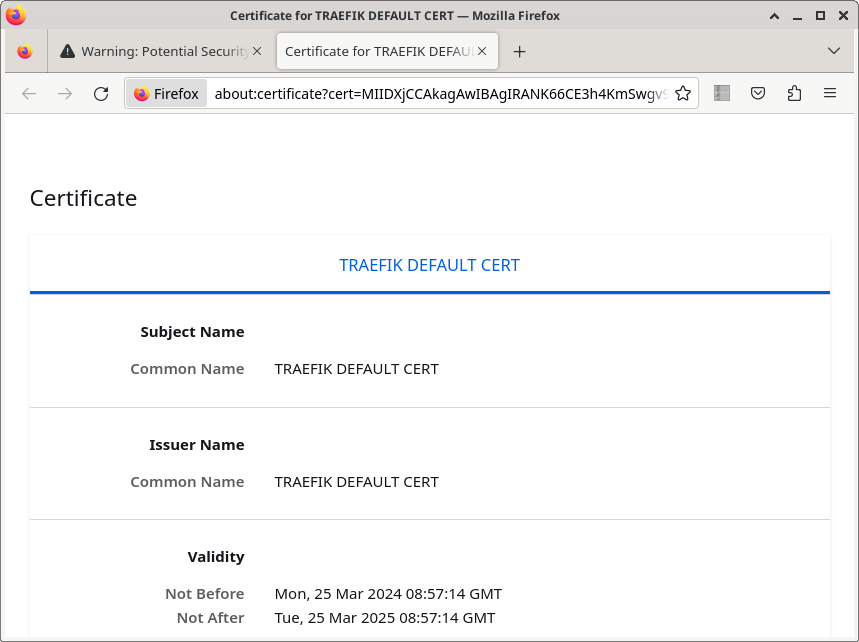 Firefox has complained about a security issue, and if we click on the Advanced button, we see that the problem is a self-signed certificate.
If we take a look at the certificate, we can see that it is a default certificate that has been generated by Traefik (Common Name TRAEFIK DEFAULT CERT).
Generating a new Common Name (CN) certificate for our own use is straight-forward, but all the cool kids are using the newer Subject Alt Names (SAN) certificates[6]Including Docker, which won't even accept a CN certificate :-/. These have the advantage of being able to use a single certificate for multiple domain names, so we'll create a single one for all the domains on our server.
Create a file called tls.conf that looks like this:
[ req ]
default_bits = 2048
distinguished_name = req_distinguished_name
req_extensions = req_ext
prompt = no

[ req_distinguished_name ]
CN = VM-K3S

[ req_ext ]
subjectAltName = @alt_names

[ alt_names ]
DNS.1 = demo.k3s
DNS.2 = nexus3.k3s
DNS.3 = dockerhub.nexus3.k3s
DNS.4 = mydocker.nexus3.k3s
The CN field is still required, but it can be just a descriptive name of the issuer, and the domain names that the certificate will be used for are in the alt_names section.
Then create the certificate:
openssl req -new -x509 \
    -extensions req_ext \
    -keyout server.key -noenc \
    -out server.crt \
    -config tls.conf \
    -days 365
Note that the -extensions req_ext argument appears to be required, even though we specify in the config file that the section is there
The certificate is saved in server.crt, and we can check that it has been generated correctly (in particular, the X509v3 extensions for SAN's) like this:
openssl x509 -noout -text -in server.crt
We also get a private key that is used to sign the certificate, saved in the file server.key, and we upload that and the certificate as a secret in Kubernetes:
kubectl create secret tls tls-cert \
    --cert server.crt \
    --key server.key
Configuring the demo app to use our new certificate
Modify your demo.yaml file so that the IngressRoute accepts requests on the websecure entry point (i.e. port 443). We also configure the name of the Kubernetes secret that contains the certificate:
apiVersion: traefik.io/v1alpha1
kind: IngressRoute
metadata:
  name: demo-ingress-route
spec:
  entryPoints:
    - websecure
  routes:
  - match: Host(`demo.k3s`)
    kind: Rule
    services:
    - name: demo-service
      port: web
  tls:
    secretName: tls-cert
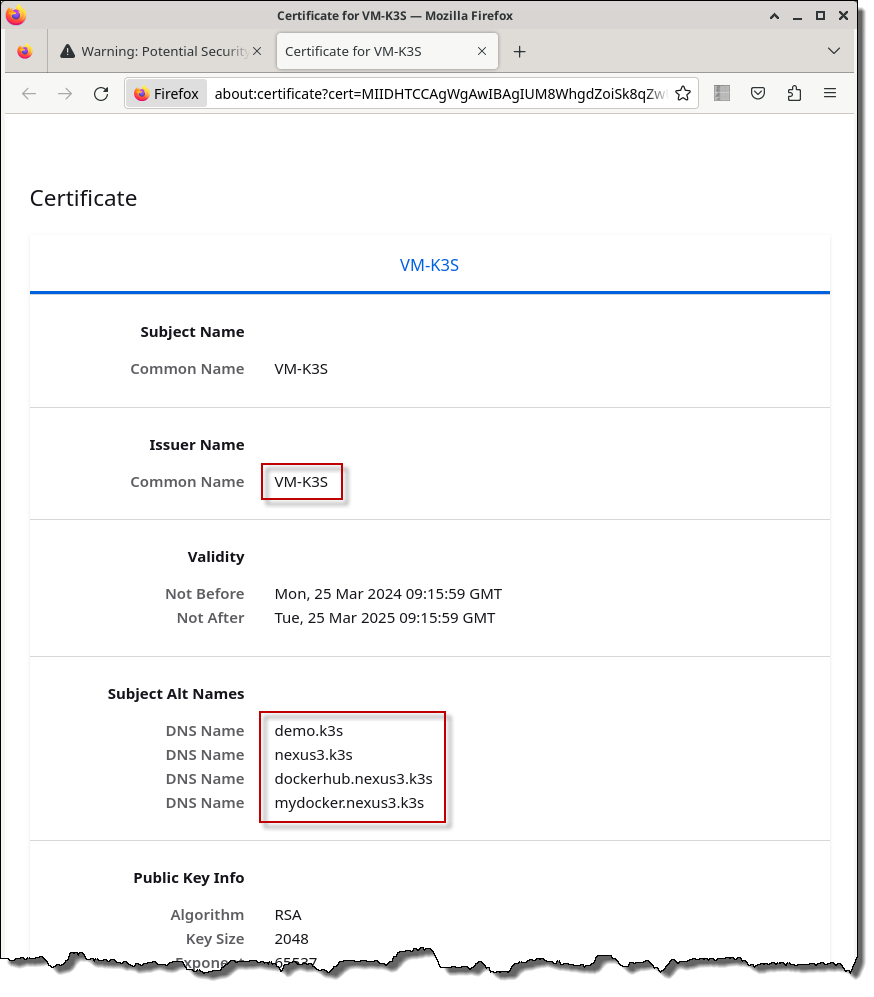
Re-apply the new YAML, and go to https://demo.k3s in a browser (see right). We still get a warning about a self-signed certificate, but if we examine the certificate, it's now the one we just created, and we can accept it as trusted, and continue on to the site. |
 |
Configuring Docker to trust our certificate
We trusted our self-signed certificate in a browser manually, but if we try to pull a Docker image from a Docker Hub mirror using it, Docker will also complain.
To get Docker to accept the certificate, copy server.crt to the client machine and save it to /etc/docker/certs.d/{SERVER-NAME}/ca.crt[7]In this example, the server name would be dockerhub.nexus3.k3s..
Restart Docker:
sudo systemctl restart docker
and docker pull should now work.
You will also need to do something similar if you want to push to your own private registry.
Configuring NuGet to trust our certificate
NuGet also doesn't trust self-signed certificates, but in this case, there's no work-around A ticket was opened about this in January 2017, and it's taken until March 2024 (!) for a PR to be submitted to (maybe) fix the problem
I worked around the problem by importing the certificate into the Windows Trust Store[8]Run this in PowerShell.:
Import-Certificate -FilePath server.crt -CertStoreLocation cert:\CurrentUser\Root
References
| ↵1 | Although there is currently a workaround. |
|---|---|
| ↵2 | Although I was able to get it working over HTTP when I was using the ingress-nginx Ingress Controller. I suspect that Traefik is doing a HTTP→HTTPS redirect somewhere, but I didn't bother figuring out what exactly was going on, since it works using Traefik and TLS. |
| ↵3 | Although I suspect this won't be happening any time soon; see below |
| ↵4 | Since there's a song-and-dance that Let's Encrypt needs to do, to ensure that you control the domain. |
| ↵5 | Which is currently only served over HTTP. |
| ↵6 | Including Docker, which won't even accept a CN certificate :-/ |
| ↵7 | In this example, the server name would be dockerhub.nexus3.k3s. |
| ↵8 | Run this in PowerShell. |


 I am a
