


Now our Kubernetes cluster is up and running, the next thing to do is deploy an application into it.
This is a simple Python webapp that prints out a bit of information about the server, and the contents of a file:
@app.route( "/" )
def home():

    # get our IP address
    try:
        with socket.socket( socket.AF_INET, socket.SOCK_DGRAM ) as sock:
            sock.connect( ( "10.255.255.255", 1 ) )
            ip_address = sock.getsockname()[ 0 ]
    except Exception as ex:
        ip_address = str( ex )

    # get the message of the day
    fname = os.environ.get( "MOTD" )
    if not fname:
        motd = "Embrace the void, there is no message of the day."
    elif not os.path.isfile( fname ):
        motd = "Can't find the MOTD file: {}".format( fname )
    else:
        with open( fname, "r", encoding="utf-8" ) as fp:
            motd = fp.read()

    # generate the response
    buf = io.StringIO()
    print( "Current time: {}".format( time.strftime( "%c" ) ), file=buf )
    print( "<br>", file=buf )
    print( "IP address: {}".format( ip_address ), file=buf )
    print( "<p> Message of the day:", file=buf )
    print( "<pre style='margin:0 0 0 2em;'> {} </pre>".format( motd ), file=buf )
    return buf.getvalue()
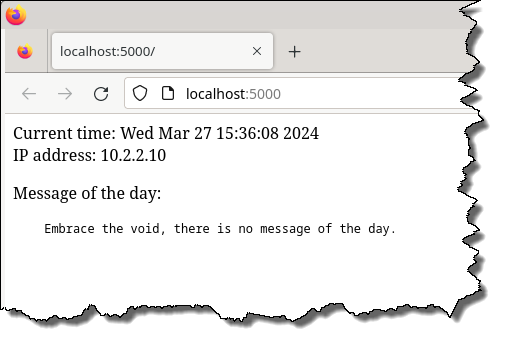 If you run it as a normal Python script[1]Not on the CoreOS machine, since Python won't be installed., and open http://localhost:5000 in a browser, you should see something like this:
Here's a Dockerfile to run it as a container:
FROM python:alpine

RUN pip install flask

WORKDIR /app
COPY demo.py ./

CMD [ "python", "demo.py" ]
Build and run the image:
docker build --tag demo .
docker run --rm \
    --name demo \
    --publish 5000:5000 \
    demo
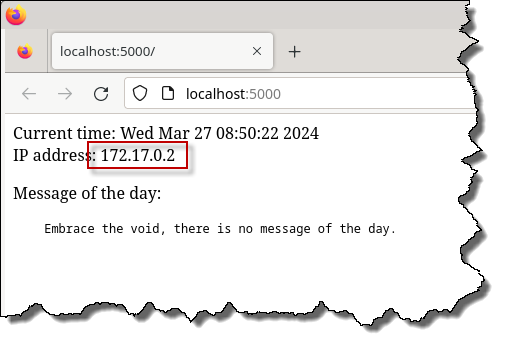 Browse to http://localhost:5000 again, and you should see the IP address has changed[2]And in this case, also the time, since the container is running in UTC.:
|
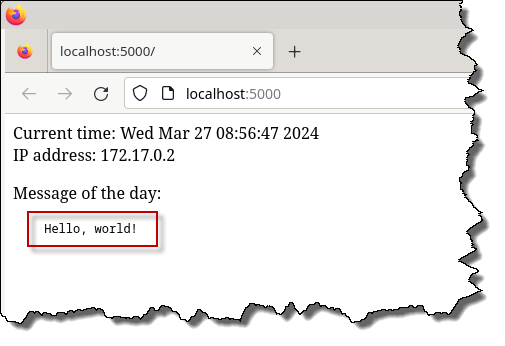
The script looks for an environment variable called MOTD that points to a message-of-the-day file, so if we set that in the container, and map a file in, the web page will then show the contents of that file e.g.
docker run --rm \
    --name demo \
    --publish 5000:5000 \
    --env MOTD=/data/motd \
    --volume /tmp/motd.txt:/data/motd  \
    demo
|
Deploying the demo into the cluster
 An application running in Kubernetes has the basic architecture shown on the right.
A container runs inside a Pod, and there can be more than one of them i.e. if the app has been implemented across multiple containers. In particular, networking will be set up so that the containers can all connect to each other over localhost.
A Deployment manages Pod's, in particular, scaling them up or down by creating and destroying Pod's. It can also inject configuration information in the containers (via a ConfingMap), and persistent disk storage (via a PVC).
A Service accepts requests and routes them to a Deployment for processing.
Finally an Ingress sits at the edge of the cluster, accepting requests from external clients and routing them to a Service for processing. While it's possible to expose a Service directly to the outside, Ingress's will handle domain names for HTTP(S) requests for you.
A note about Ingress Controllers
By default, K3s comes with Traefik, which will manage ingress for you, but the most popular one seems to be ingress-nginx, which is based on NGINX, and maintained by the Kubernetes community. However, you have to be super-careful because there's another one called kubernetes-ingress, which is also based on NGINX, but is maintained by F5.
I originally tried doing things with ingress-nginx[3]Because it's widely used, and a lot of my stuff already uses NGINX., but it has some serious short-comings:
- it only handles HTTP(S) traffic (!), and while it's unofficially possible to do other TCP traffic (e.g. SSH), you have to do some serious screwing around to get it to work

- it can't handle traffic on the same path but on different ports
These are fairly simple, common use cases, so it's quite surprising that ingress-nginx doesn't handle them.
Anyway, I switched back to Traefik and got things working. However, while ingress is a generic Kubernetes concept, Traefik doesn't really integrate with it, and implements it's own thing. But as long as you're willing to accept these inconsistencies, it seems to work[4]And since it comes bundled with K3s, you don't have to install a third-party package, which is always a Good Thing™..
Managing persistent disk storage
We'll start off by allocating some persistent[5]It needs to be persistent, so that it will survive the container being destroyed. disk storage for the MOTD file.
K3s will have already created a persistent volume (PV) by default, using the Local Storage Provider i.e. it will only be available to pods running on the same node, but since we only have one node in our cluster, this is not an issue.
We request part of the PV to be reserved for us, by creating a persistent volume claim (PVC). Save the following in a file called pvc.yaml:
apiVersion: v1
kind: PersistentVolumeClaim
metadata:
  name: demo-pvc

spec:
  accessModes:
    - ReadWriteOnce
  storageClassName: local-path
  resources:
    requests:
      storage: 1M
Note that while our demo app will only ever read from this storage, K3S's Local Storage Provider doesn't support read-only PVC's[6]However, we will mount the volume read-only into the container, so it's not a total bust..
Install the config, and check that it was created:
[core@vm-k3s ~]$ kubectl apply -f http://10.2.2.10:8000/pvc.yaml persistentvolumeclaim/demo-pvc created [core@vm-k3s ~]$ kubectl get pvc NAME STATUS VOLUME CAPACITY ACCESS MODES STORAGECLASS VOLUMEATTRIBUTES CLASS AGE demo-pvc Pending local-path7s
Note that the status is Pending, since the storage doesn't actually get allocated until someone requests it[7]Files are stored in /var/lib/rancher/k3s/storage/, and if you check in there, it will be empty.. This can cause issues if you need to preload data into it, because you need to create a Deployment that uses the PVC before the storage actually gets allocated, which starts the containers, which will go looking for the data, which won't be there, because you couldn't load it in, because the storage hadn't yet been allocated
Creating a Deployment
Our Deployment is configured like this:
apiVersion: apps/v1
kind: Deployment
metadata:
  name: demo

spec:
  selector:
    matchLabels:
      name: demo
  template:
    metadata:
      labels:
        name: demo

    spec:

      volumes:

      - name: data
        persistentVolumeClaim:
          claimName: demo-pvc

      containers:

        - name: demo
          image: demo:latest
          imagePullPolicy: Never
          ports:
            - name: web
              containerPort: 5000

          volumeMounts:
            - name: data
              mountPath: /data
              readOnly: true
Note at the bottom of the file that we mount the PVC read-only.
When we install the Deployment, and check on it:
[core@vm-k3s ~]$ kubectl apply -f http://10.2.2.10:8000/demo.yaml
deployment.apps/demo created

[core@vm-k3s ~]$ kubectl get deploy
NAME   READY   UP-TO-DATE   AVAILABLE   AGE
demo   0/1     1            0           8s
you will see that the Deployment has been created, but you may also see that it doesn't seem to have started properly.
Note that the Deployment was configured with imagePullPolicy: Never, so if the image is not already there in the local Docker registry, the Deployment will just sit there, waiting for the image to appear.
In this case, you can either build the image on the K3s server, or transfer it from another machine[8]Using docker save/load., and as soon as it's there, the Deployment will go from READY 0/1 to READY 1/1.
If you check /var/lib/rancher/k3s/storage/[9]Or /mnt/data/k3s-data/var-lib-rancher/k3s/storage/, since it's been symlinked., you will see that a directory[10]This will get mounted into the container at /data/. has been created in the K3s local storage:
[core@vm-k3s ~]$ sudo ls -l /var/lib/rancher/k3s/storage/
total 4
drwxrwxrwx. 2 root root 4096 Mar 25 09:06 pvc-d034717c-4259-425e-8361-d2db13746e43_default_demo-pvc
The Deployment will have created a pod with our demo container running it:
[core@vm-k3s ~]$ kubectl get pod -o wide
NAME                    READY   STATUS    RESTARTS   AGE    IP           NODE     NOMINATED NODE   READINESS GATES
demo-7767589db6-lk6n9   1/1     Running   0          8m9s   10.42.0.10   vm-k3s
and we can request the web page from it:
[core@vm-k3s ~]$ curl 10.42.0.10:5000
Current time: Mon Mar 25 09:15:16 2024
<br>
IP address: 10.42.0.10
<p> Message of the day:
<pre style='margin:0 0 0 2em;'> Embrace the void, there is no message of the day. </pre>
Creating a Service to manage the Deployment
Append the following[11]The --- is a separator. to your demo.yaml, and re-apply it:
---

apiVersion: v1
kind: Service
metadata:
  name: demo-service
spec:
  type: ClusterIP
  ports:
    - name: web
      port: 80
      targetPort: web
      protocol: TCP
  selector:
    name: demo
A service is now running, on a different IP address that accepts requests on port 80, and routes them to the demo Deployment on port web (i.e. 5000):
[core@vm-k3s ~]$ kubectl get service
NAME           TYPE        CLUSTER-IP     EXTERNAL-IP   PORT(S)   AGE
kubernetes     ClusterIP   10.43.0.1      <none>        443/TCP   33m
demo-service   ClusterIP   10.43.36.140   <none>        80/TCP    23s

[core@vm-k3s ~]$ curl 10.43.36.140
Current time: Mon Mar 25 09:26:15 2024
<br>
IP address: 10.42.0.10
<p> Message of the day:
<pre style='margin:0 0 0 2em;'> Embrace the void, there is no message of the day. </pre>
Note that the web page is still reporting an IP address of 10.42.0.10, since it's still running in the same container, we just curl'ed the Service, which forwarded the request to the Deployment, which forwarded the request to the container running in the Pod.
Create an IngressRoute to accept requests from external clients
The final step is to create an IngressRoute[12]As mentioned before, Traefik does things a little differently from Kubernetes, and this is a Traefik thing..
Append the following[13]Yes, Traefik does indeed use backticks to your demo.yaml, and re-apply it:
---

apiVersion: traefik.io/v1alpha1
kind: IngressRoute
metadata:
  name: demo-ingress-route
spec:
  entryPoints:
    - web
  routes:
  - match: Host(`demo.k3s`)
    kind: Rule
    services:
    - name: demo-service
      port: web
This tells Traefik that for any HTTP requests arriving on its web entry point (i.e. port 80), if it has a Host: header of demo.k3s, then send the request to demo-service.
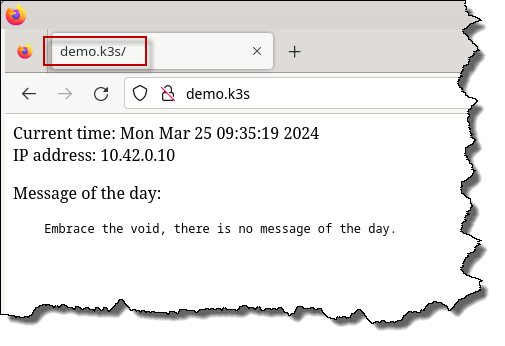 Add a DNS entry[14]For example, by editing your hosts file. to your client machine that links the name demo.k3s with the IP address of the K3s server[15]In my case, it's 10.2.2.33..
Then open http://demo.k3s in a browser.
Managing the persistent data
Finally, we'll set up the MOTD file:
[core@vm-k3s core]$ sudo bash

[root@vm-k3s core]# cd /mnt/data/k3s-data/var-lib-rancher/k3s/storage/

[root@vm-k3s storage]# ls -l
total 4
drwxrwxrwx. 2 root root 4096 Mar 25 09:43 pvc-d034717c-4259-425e-8361-d2db13746e43_default_demo-pvc

[root@vm-k3s storage]# cd pvc-d034717c-4259-425e-8361-d2db13746e43_default_demo-pvc/

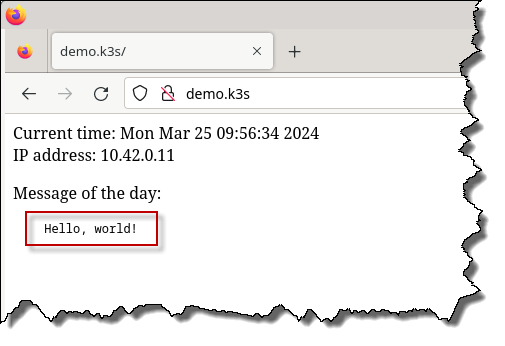
[root@vm-k3s pvc-d034717c-4259-425e-8361-d2db13746e43_default_demo-pvc]# echo "Hello, world!" >motd.txt

[root@vm-k3s pvc-d034717c-4259-425e-8361-d2db13746e43_default_demo-pvc]# ls -l
total 4
-rw-r--r--. 1 root root 14 Mar 25 09:46 motd.txt
The volume has already been mounted into the container, so we just need to set the MOTD environment variable. Add the following to your demo.yaml:
---

apiVersion: v1
kind: ConfigMap
metadata:
  name: demo-config
data:
  MOTD: /data/motd.txt
and modify the Deployment to include this ConfigMap:
    envFrom:
    - configMapRef:
        name: demo-config
Re-apply the YAML[16]The final YAML is here. and refresh your browser:
Note that even if you blow away your CoreOS installation and re-provision the machine, because the Docker images and K3s data (i.e. configuration and persistent data) are on the external data disk, they will survive the re-provisioning, and when the machine comes back up, everything will be up and running, and everything Just Works™.
References
| ↵1 | Not on the CoreOS machine, since Python won't be installed. |
|---|---|
| ↵2 | And in this case, also the time, since the container is running in UTC. |
| ↵3 | Because it's widely used, and a lot of my stuff already uses NGINX. |
| ↵4 | And since it comes bundled with K3s, you don't have to install a third-party package, which is always a Good Thing™. |
| ↵5 | It needs to be persistent, so that it will survive the container being destroyed. |
| ↵6 | However, we will mount the volume read-only into the container, so it's not a total bust. |
| ↵7 | Files are stored in /var/lib/rancher/k3s/storage/, and if you check in there, it will be empty. |
| ↵8 | Using docker save/load. |
| ↵9 | Or /mnt/data/k3s-data/var-lib-rancher/k3s/storage/, since it's been symlinked. |
| ↵10 | This will get mounted into the container at /data/. |
| ↵11 | The --- is a separator. |
| ↵12 | As mentioned before, Traefik does things a little differently from Kubernetes, and this is a Traefik thing. |
| ↵13 | Yes, Traefik does indeed use backticks |
| ↵14 | For example, by editing your hosts file. |
| ↵15 | In my case, it's 10.2.2.33. |
| ↵16 | The final YAML is here. |


 I am a
