


Namespaces provide an abstraction layer over certain system resources (e.g. CPU, RAM, files), which allows processes to have different views of the system.
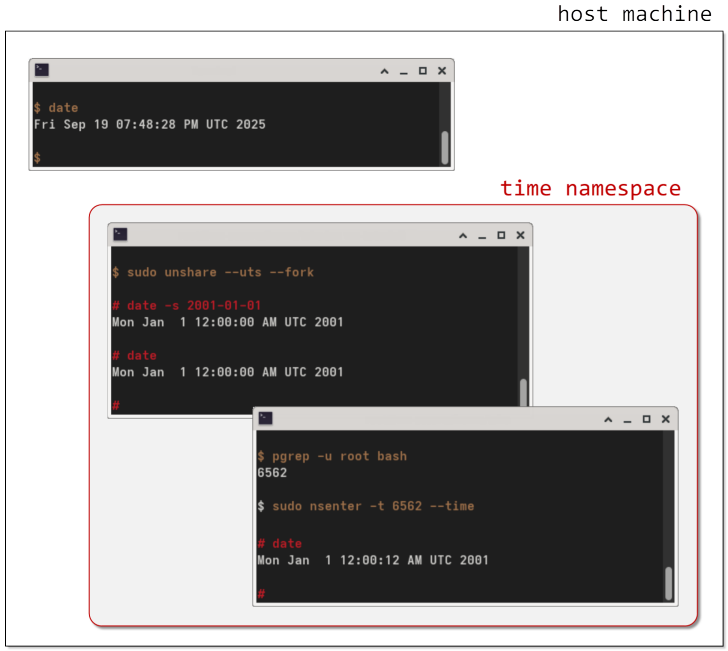
For example, you could create a time namespace, change the system time in it, and then any processes running in that namespace will see the modified system time, not the real time on the host (see right).
At the time of writing, the following resources can be namespace'd:
- mount points (mnt): controls what files a process can see
- process ID's (pid): an independent set of PID's
In particular, each pid namespace has its own init process (PID 1, the first process created in that namespace), that has the usual special treatment e.g.- when it ends, all other processes in the namespace will also end
- orphaned processes are attached to it
Taken from this article, which contains a picture of two computer programming legends - I challenge you to look at it, and not break out into a big grin from ear to ear
 (just in case)
namespace allows processes to see different host and domain names
Namespaces are managed via a pseudo-filesystem, at /proc/$PID/ns/.
An example of creating and using namespaces
Let's start off by creating[3]The unshare command is oddly-named, but the man page gives a clue:
Child processes are normally placed in the same namespaces as their parent, but unshare bypasses this, unsharing the specified namespaces, and creating new ones for the new process instead. a new uts namespace. This creates a new uts namespace, and runs a program in it, by default, a shell[4]As defined by $SHELL.. |
$ sudo unshare --uts |
| If we check the hostname, we can see that it's the same as the host. |
# hostname vm-tutorial |
| Let's change it. |
# hostname foobar # hostname foobar |
$ hostname vm-tutorial | But if we go to another terminal, which will be running outside our namespace, we can see that the hostname is still the same as before. |
$ pgrep -u root bash 5395 $ sudo nsenter -t 5395 --uts # hostname foobar |
From this second terminal, let's start another shell process in our uts namespace. First, we have to find the PID of the shell that's running in the namespace.
Then we start another shell, and put it in the same namespace. And we can see that the new shell also sees the modified hostname. |
| From a third terminal, let's check on the namespace itself. |
$ sudo lsns | grep bash 4026533011 uts 2 5395 root -bash |
| If we check on the bash process's namespaces under /proc/, we can see this namespace there. |
$ sudo ls -l /proc/5395/ns total 0 lrwxrwxrwx. 1 root root 0 Sep 27 01:52 cgroup -> 'cgroup:[4026531835]' lrwxrwxrwx. 1 root root 0 Sep 27 01:52 ipc -> 'ipc:[4026531839]' lrwxrwxrwx. 1 root root 0 Sep 27 01:52 mnt -> 'mnt:[4026531841]' lrwxrwxrwx. 1 root root 0 Sep 27 01:52 net -> 'net:[4026531840]' lrwxrwxrwx. 1 root root 0 Sep 27 01:52 pid -> 'pid:[4026531836]' lrwxrwxrwx. 1 root root 0 Sep 27 01:52 pid_for_children -> 'pid:[4026531836]' lrwxrwxrwx. 1 root root 0 Sep 27 01:52 time -> 'time:[4026531834]' lrwxrwxrwx. 1 root root 0 Sep 27 01:52 time_for_children -> 'time:[4026531834]' lrwxrwxrwx. 1 root root 0 Sep 27 01:52 user -> 'user:[4026531837]' lrwxrwxrwx. 1 root root 0 Sep 27 01:51 uts -> 'uts:[4026533011]' |
| Exit the first two shells, and since there are no longer any processes in our namespace, it will be automatically destroyed. |
$ sudo lsns | grep bash $ |
References
| ↵1 | Apparently so-named after the data structure returned by the uname() system call. "Time sharing" refers not to the idea of sharing the system date/time, but a feature, back in the day, that allowed more than one person to use a computer at the same time.
Taken from this article, which contains a picture of two computer programming legends - I challenge you to look at it, and not break out into a big grin from ear to ear |
|---|---|
| ↵2 | This is how you can run as root inside a Docker container, but not outside, or vice versa. |
| ↵3 | The unshare command is oddly-named, but the man page gives a clue:
Child processes are normally placed in the same namespaces as their parent, but unshare bypasses this, unsharing the specified namespaces, and creating new ones for the new process instead. |
| ↵4 | As defined by $SHELL. |


 I am a
