


If you reboot or shutdown the server, you will quickly notice that there's a long delay (90s  ) while systemd waits for some Docker-related stuff.
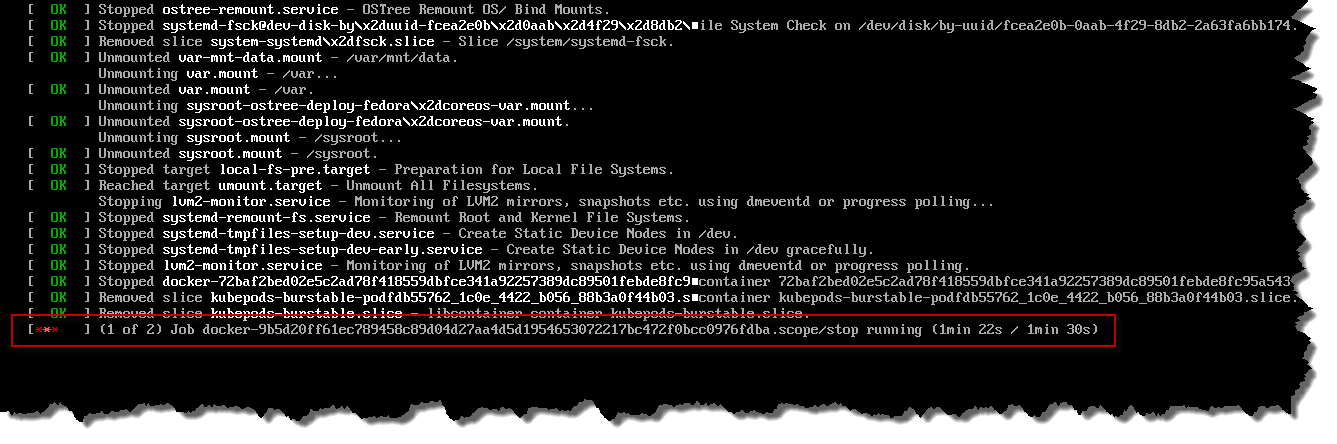
At first, it looked like it might be related to this, where stopping K3s doesn't stop any of the user pods (apparently by design, to allow K3s to be updated without affecting availability). Running /usr/local/bin/k3s-killall.sh is supposed to kill everything K3s-related, but it didn't seem to kill the Docker containers. Stopping the Docker service:
sudo systemctl stop docker
sudo systemctl stop docker.socket
certainly made them go away, but I was still seeing slow shutdowns.
systemd seems to be waiting for a bunch of Docker scopes, so not exactly the same as this, this, and this, but suspiciously similar[1]These bug reports are some 10 years old (!), so hopefully fixed, by now.. Manually stopping these scopes made the problem go away:
systemctl stop 'docker-*.scope'
but is in itself very slow, so doesn't really fix the problem 
I tried a bunch of different things based on this post, but nothing really worked, so I rolled up my sleeves and started digging into what was going on.
Of services, cgroup's and scope's, oh my!
Control Groups are a Linux feature that let it group processes together, and control how much resources each one gets e.g. CPU, disk, memory, etc. By default, each systemd service gets its own cgroup, and while scope's are similar, they are used to manage processes that systemd didn't start itself. So, somebody has started a bunch of processes, got systemd to wrap them in some scope's, and they don't appear to be getting cleaned up
Back in the day[2]Trawling through the forums, one thing that became apparent was that Docker and systemd don't always work so well together, and it seems that these guys have been butting heads for a while  , Docker used to manage cgroup's itself, but somewhere along the way, switched over to letting systemd handle it. However, there is an option to switch[3]Both Docker and systemd seem to use libcontainer, which has two cgroup drivers:
- cgroupfs: talks to the kernel via its file-based API (at /sys/fs/cgroup/)
- systemd: talks to systemd over D-Bus Docker back to handling cgroup's itself, so I wondered if doing this might make the problem go away.
Of course, there is the question of whether it's safe to do this. Having two cgroup managers on one machine seems to be asking for trouble[4]As they will both be trying to control what processes can and can't do., but my machine is quite lightly-loaded, so it's maybe worth a shot.
Configuring Docker to manage cgroup's
It's possible to configure Docker to use its own cgroup driver in /etc/docker/daemon.json:
{
  "exec-opts": [ "native.cgroupdriver=cgroupfs" ]
}
but this can also be configured in Docker's systemd service file, and it can't be in both  The service file is at /usr/lib/systemd/system/docker.service, and sure enough, it explicitly configures systemd to manage cgroup's:
...
[Service]
Type=notify
EnvironmentFile=-/etc/sysconfig/docker
# the default is not to use systemd for cgroups because the delegate issues still
# exists and systemd currently does not support the cgroup feature set required
# for containers run by docker
ExecStart=/usr/bin/dockerd \
          --host=fd:// \
          --exec-opt native.cgroupdriver=systemd \
          $OPTIONS
ExecReload=/bin/kill -s HUP $MAINPID
...
Cool, no problems, we'll do the same trick as here, and tweak this setting when the server is being provisioned, except... /usr/ is part of the immutable base OS and is mounted read-only. Ignition wasn't able to modify the file during provisioning; I wasn't even able to install a new version of the file, using storage.files 
OK, well, it's also possible to inject environment variables into the Docker daemon by dropping files into /etc/systemd/system/docker.service.d/ e.g.
[Service]
Environment="FOO=bar"
but there is no setting for the cgroup driver. Sigh...
OK, still no problem, I'll add the new option to /etc/sysconfig/docker during Ignition provisioning[5]At the same time as increasing the number of file descriptors for Docker.. - but it didn't have any effect
Finally, I temporarily remounted /usr/ as read-write:
[core@vm-k3s ~]$  mount | grep /usr
/dev/sda4 on /usr type xfs (ro,relatime,seclabel,attr2,inode64,logbufs=8,logbsize=32k,prjquota)

[core@vm-k3s ~]$  sudo mount -o remount,rw /dev/sda4 /usr

[core@vm-k3s ~]$  mount | grep /usr
/dev/sda4 on /usr type xfs (rw,relatime,seclabel,attr2,inode64,logbufs=8,logbsize=32k,prjquota)
and modified the file myself. I rebooted the server twice - once to clear out the existing containers, scopes, slices, and $DEITY knows what else , and once to see if the change worked, and ta-da - IT WORKED!!! 
It got to reboot.target really quickly, and... then hung again, waiting for a python and local-path-prov process to finish 
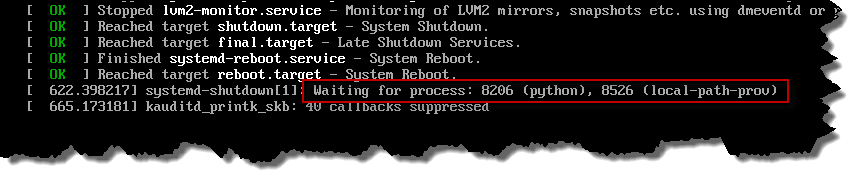
It was around this point that I put my foot through the monitor, and gave up
Gracefully shutting down deployments
It looks like K3s' Local Path Provisioner not wanting to shut down is the root cause of the problem. Using hostPath storage might work, but has its own issues Using Podman instead of Docker might also make the problem go away
In the end, I wrote a script that scales all my deployments down to 0, and waits for their pods to go away[6]Avoid giving yourself a heart attack, and remember to scale things back up when the server restarts  . There's still the problem of the local-path-prov process still hanging around, but 90 seconds should surely be enough for it to finish flushing everything to disk...
References
| ↵1 | These bug reports are some 10 years old (!), so hopefully fixed, by now. |
|---|---|
| ↵2 | Trawling through the forums, one thing that became apparent was that Docker and systemd don't always work so well together, and it seems that these guys have been butting heads for a while |
| ↵3 | Both Docker and systemd seem to use libcontainer, which has two cgroup drivers: - cgroupfs: talks to the kernel via its file-based API (at /sys/fs/cgroup/) - systemd: talks to systemd over D-Bus |
| ↵4 | As they will both be trying to control what processes can and can't do. |
| ↵5 | At the same time as increasing the number of file descriptors for Docker.. |
| ↵6 | Avoid giving yourself a heart attack, and remember to scale things back up when the server restarts |


 I am a
