Awasu 3.0.2.alpha2
IMPORTANT: This is an alpha release (what's this?).
Some features may not be complete and there will probably be bugs!
You must be already running 3.0.2.alpha1.
To install:
- Read the release notes below first!
- Backup your Awasu installation directory and keep it, even if the alpha appears to work correctly.
- Unpack one (!) of the following zips on top of your existing installation:
- Delete the Awasu.upgrade file from the Awasu installation directory.
- Download and unpack this file into the Awasu installation directory.
- If you like to be tidy, delete the following files:
- $/cfe.exe
- $/python25.zip
- $/python25.dll
- $/Resources/Iamges/awasu.ico
Optimizations
- Optimized how Awasu accesses the archive database.
- Changed the available choices for the Database access option in the Archive tab of the Program Options.
- Optimized how Awasu checks for new items for each channel during startup.
- Optimized how Awasu processes regular expressions.
Email
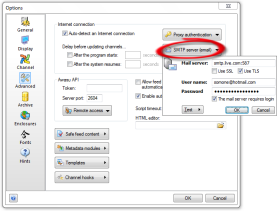 Awasu now has new infrastructure for sending emails, which is configured in the Advanced tab of the Program Options dialog. This works much better than the old system, and also allows emails to be sent via public email services such as GMail or Hotmail.

If you are using the
SendEmail channel hook, this extension now uses the above global SMTP settings (instead of having its own settings). This means you
must configure your SMTP settings, as described above, otherwise it will not be able to send emails.
Configuring Awasu to use a standard SMTP server

| To configure Awasu to use a standard SMTP server to send emails:
- Enter the server address. If the server uses a non-standard port (i.e. not port 25), append it to the address e.g. myserver.com:123.
- Enter the username and password.
- Most SMTP servers will also require you to login before sending any emails.
|
Configuring Awasu to use GMail

| To configure Awasu to use GMail to send emails:
- Enter a server address of gmail.com:465.
- Enter your username and password.
- Enable SSL and login.
|
Configuring Awasu to use Hotmail
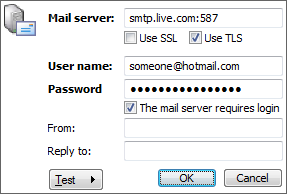
| To configure Awasu to use Hotmail to send emails:
- Enter a server address of smtp.live.com:587.
- Enter your username and password.
- Enable TLS and login.
|
Minor changes and bug fixes
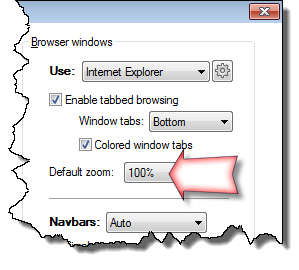 Added the ability to zoom in/out of web pages.
The standard keyboard shortcuts of Ctrl-Plus and Ctrl-Minus are assigned to zoom in and out, but if you are already using Awasu, your existing shortcuts won't be upgraded. Either run admin.exe and reset your keyboard shortcuts, or assign them manually (via the Tools|Customize dialog).
You can also set the default zoom in the Display tab of the Program Options.
